CSS - Frontmatter Formatting
Setup
Go to Settings, Appearance, and scroll all the way down to the CSS snippets section. You might already have some there, or not. It does not matter for us.
Click on the folder icon. This should open the local folder containing the snippets. Create a new file and give it a name that makes sense to you. For example, frontmatter colors.css. Make sure that the file extension is css. If you don't see your file extensions, click on View, Show, and File name extensions (in Windows Explorer).
Now open the file and copy the CSS code below into it. Save the file, go back to Obsidian and refresh the list of snippets. Enable the frontmatter colors one, and that should do it. If it does not, you may have to restart Obsidian.
Result
This snippet lets you format the appearance of the YAML frontmatter block in notes. The example snippet below results in this:
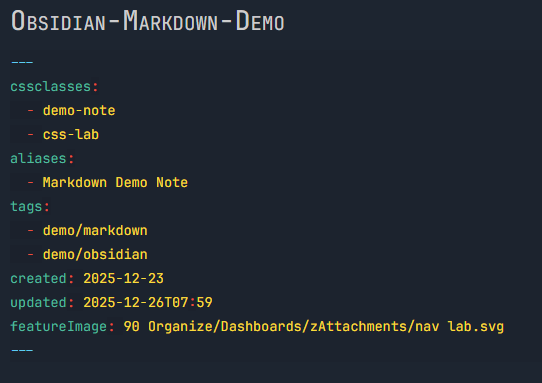
Code
/* The collapse icon on the left side of frontmatter */
.cm-fold-indicator .collapse-icon svg {
    stroke: #25D0F7;
}
/* The triple dashes that wrap the frontmatter block */
.cm-line .cm-def.cm-hmd-frontmatter {
    color: #25D0F7 !important;
}
/* Font size for all frontmatter elements */
.cm-s-obsidian .cm-hmd-frontmatter {
        font-size:90%;
}
/* Property names on the left (Week, Walk, Challenge2, etc.) */
.cm-line .cm-atom.cm-hmd-frontmatter {
    color: #18BC9C !important;
}
/* The colon after field names and list item dashes */
.cm-line .cm-hmd-frontmatter.cm-meta {
    color: #FC3634 !important;
}
/* Regular text values (strings, dates without numbers, emojis) */
/* Examples: "2025-W17", "test note", "🟢", "BJ/Daily" */
.cm-line .cm-hmd-frontmatter:not(.cm-atom):not(.cm-meta):not(.cm-number):not(.cm-keyword):not(.cm-def) {
    color: #FFD700;
}
/* Numeric values in frontmatter */
/* Examples: 0, 07, 00 */
.cm-line .cm-hmd-frontmatter.cm-number {
    color: #FFD700 !important;
}
/* Boolean values */
/* Examples: true, false */
.cm-line .cm-hmd-frontmatter.cm-keyword {
    color: #FFD700 !important;
    font-weight: 600;
}
/* List item dash and spacing in arrays (tags, etc.) */
.cm-line .cm-hmd-frontmatter.cm-meta .cm-indent-spacing {
    color: #FC3634;
}
/* The dash character in list items */
.cm-line .cm-hmd-frontmatter.cm-meta {
    color: #FC3634;
}
/* List item values (the actual tag names) */
.cm-line[style*="text-indent"] .cm-hmd-frontmatter:not(.cm-meta) {
    color: #FFD700;
}
/* ==========================================
   ALTERNATIVE: Simplify all value colors
   ========================================== */

/* If you want all values to be the same color, uncomment this
   and comment out the individual value rules above */
/*
.cm-line .cm-hmd-frontmatter:not(.cm-atom):not(.cm-meta):not(.cm-def) {
    color: #FFED68;
}
*/
/* ==========================================
   OPTIONAL: Background for entire frontmatter
   ========================================== */
.cm-line:has(.cm-hmd-frontmatter) {
    background-color: rgba(0, 0, 0, 0.05);
    padding: 2px 0;
}